One address per job
Every heartbeat has its own address with a random code of 32 hex characters. The job calls it via GET or POST, and the portal responds with successful. Nothing more is needed: no agent, no library, no token in the header.
New: temperature, fans, power supplies and SSD health per server. View hardware health
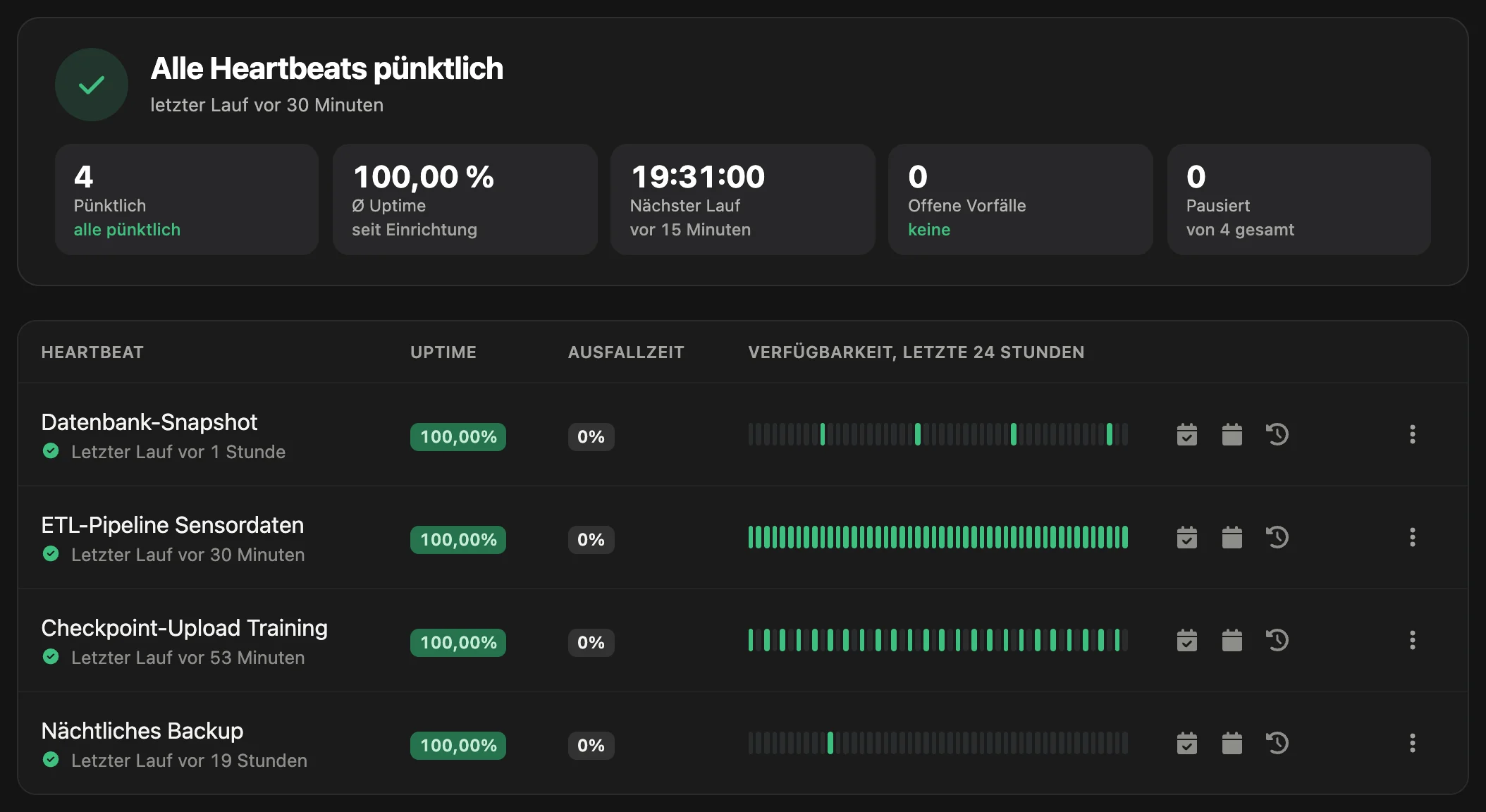
A backup that stopped running three weeks ago does not produce an error message. With a heartbeat, the job checks in with PeakNode after every successful run. If this sign of life does not arrive, you get an alert.
Screenshot from the portal with sample data (German interface).
Cron job monitoring with heartbeats watches tasks that run on their own: cron jobs (scheduled tasks on the server), backups, training and evaluation runs. In PeakNode every heartbeat gets its own address, which the job calls after every successful run. You define how often the sign of life is expected and how late it may be. If it stays away longer, PeakNode opens an incident and notifies the selected channels.
A heartbeat knows two states: the sign of life arrived, or it did not. If the job fails, it simply does not call the address.
Every heartbeat has its own address with a random code of 32 hex characters. The job calls it via GET or POST, and the portal responds with successful. Nothing more is needed: no agent, no library, no token in the header.
You enter how often the job runs and give it a grace period, for example its usual run time. Only when the interval plus the grace period have passed without a call does the run count as missed. The default when creating a heartbeat is 1 hour with a 5-minute grace period.
A new heartbeat shows “Pending first run”, and the deadline only starts with the first sign of life. So you can create it before the job runs for the first time.
A missed run opens an incident with the reason “Heartbeat missed at expected time”. The alert goes to the heartbeat’s channels, with reminders and escalation if you set them up. The next call closes the incident and triggers the all-clear.
During a maintenance window, a missing call does not count. For intervals in days, PeakNode also calculates in the account’s time zone, so that a job scheduled by local time does not trigger a false alarm on the day the clocks change.
The detail page shows uptime, downtime, incidents, the last run and the missed runs. Heartbeats can be assigned to a project and shown on a status page.
| Job | Expect a heartbeat every | Grace period | Status in the portal |
|---|---|---|---|
| Nightly backup | 1 day | 2 hours | Heartbeat is up |
| Checkpoint sync of the training run | 30 minutes | 10 minutes | Heartbeat is up |
| Weekly evaluation run | 7 days | 6 hours | Pending first run |
| Log rotation | 1 hour | 5 minutes | Heartbeat is down |
Example. The field names “Expect a heartbeat every” and “Grace period” and the states appear like this in the portal.
| Job | When the address is called | Example interval and grace period |
|---|---|---|
| Cron job | At the end of the crontab line, chained with &&, so that only a successful run counts | Interval as for the cron job, grace period equal to the run time |
| Backup | After the last step of the script, for example after verifying the archive | 1 day, grace period 2 hours |
| Training run | From the training script after every saved checkpoint | Checkpoint interval, grace period of the same length |
| Evaluation or batch inference | At the end of the run | 1 day, grace period 2 hours |
| Service in the internal network | A script in the network checks the service locally and calls the address only on success | 5 minutes, grace period 2 minutes |
The values in the table are examples. You can set intervals in minutes, hours or days (1 minute to 10 years) and a grace period in seconds, minutes, hours or days. The portal rejects calls less than about one minute apart; they do not count as another run. What happens on the GPUs during a training run is shown by GPU monitoring.
The job only needs outbound access to the portal and a tool that can call an address, for example curl.
Under “Heartbeats”, go to “Create heartbeat”, enter a name, enter the interval under “Expect a heartbeat every” and the grace period below it. Select notification channels.
The detail page shows the heartbeat’s address. Chain the call to the job with &&, so that it is only sent after a successful run. In the example, <CODE> stands for the code of your heartbeat.
# Crontab: backup at 02:30, sign of life only on success
30 2 * * * /opt/backup/run.sh && curl -fsS -m 10 https://peaknode.de/webhook-heartbeat/<CODE> >/dev/null
Use “Send heartbeat manually” on the detail page or a call in the terminal to test the path. The heartbeat then shows “Heartbeat is up” and the last run.
curl -fsS -m 10 https://peaknode.de/webhook-heartbeat/<CODE>
successful
Continue to:
A heartbeat monitor expects a regular sign of life from a job and raises an alert if it is missing. In PeakNode the job calls its own address after every successful run. If no call arrives within the interval plus the grace period, PeakNode opens an incident and notifies the selected channels.
The Proof of Concept plan is free and includes 1 heartbeat for testing. Premium at €149 per month includes 50, Enterprise at €490 per month 250.
With a heartbeat that the cron job calls after every successful run: if the call does not arrive, PeakNode reports it. Create a heartbeat with the cron job’s interval and append the call to the heartbeat address to the crontab line with &&. If the job aborts, hangs or the cron service stops running, the sign of life does not arrive and you are notified.
The grace period is the time by which a run may be late before an alert is triggered. Enter roughly the run time of the job. A backup that starts daily and takes up to an hour, for example, gets an interval of 1 day and a grace period of 2 hours.
Only indirectly. The address does not accept an error status, an exit code, the run time or log output. So add the call in a way that it is only sent after a successful run: then a missing sign of life means that the job did not complete.
Yes. The job calls the address from the inside out, and nothing needs to be opened for inbound traffic. This is also the way for internal services that an uptime monitor in the cloud edition cannot reach.
A paused heartbeat does not accept calls and does not trigger an alert. After resuming, the deadline made up of interval and grace period starts again. For planned work, a maintenance window is the better way, because it ends on its own.
A cron job is a task that the cron service starts at fixed times on Linux and Unix servers, for example a nightly backup or an hourly sync. If such a job fails, there is often no error message, because nobody is waiting for its result. That is exactly what a heartbeat is for.
The cron jobs of a user are shown by crontab -l; the system ones are in /etc/crontab and /etc/cron.d/. In addition, systemd timers can start tasks, and systemctl list-timers lists them. For every job whose absence should be noticed, create a separate heartbeat in PeakNode.
Create an account, create a heartbeat, add the address to the cron job. The Proof of Concept plan is free and includes 1 heartbeat for testing.